KeyDock Pro · Private macOS productivity

Secrets and Terminal workflows, one keystroke away.

KeyDock Pro keeps passwords, private notes, URLs, and your own Terminal commands ready in the macOS menu bar — without an account or a developer-operated cloud vault.

Explore KeyDock Pro Free edition · App Store soon

Pro direct download coming soon · Free Mac App Store edition in preparation · Requires macOS 12 or later

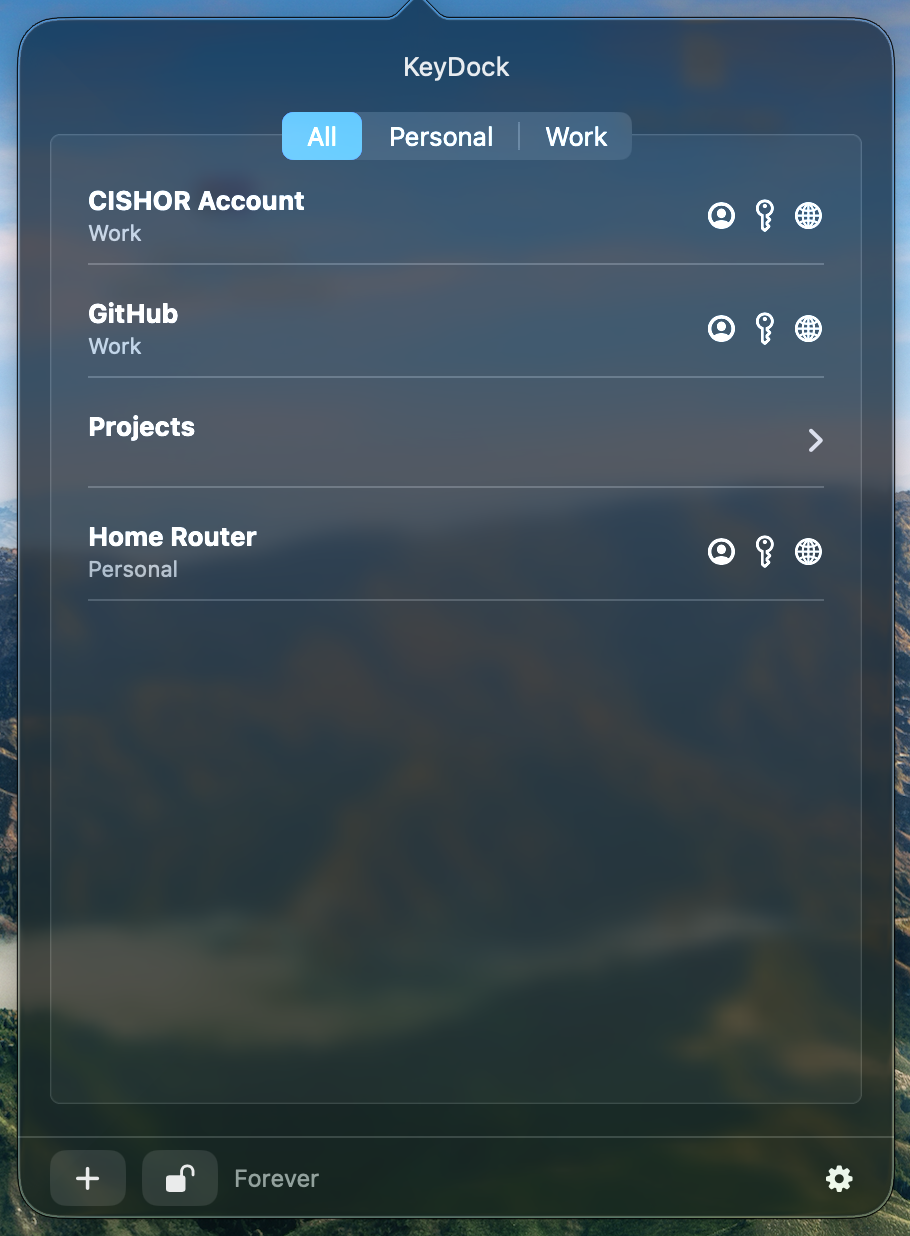
KeyDock menu-bar vault with folders and private entries
KeyDock ProEverything in the free edition, plus Terminal command shortcuts.

The complete KeyDock experience

One private dock for credentials and commands.

KeyDock Pro is the paid, directly distributed edition for people who want the same fast vault plus repeatable Terminal workflows. Your saved data remains local and both editions use the same KeyDock vault when installed on the same Mac.

Paid · Direct download

KeyDock Pro

Turn the menu-bar vault into a compact command launcher without giving up local-first storage.

  • Passwords, logins, private notes, and website URLs
  • Saved Terminal commands launched only when you choose
  • Folders, labels, keyboard navigation, and drag-and-drop ordering
  • The same local Keychain-backed vault as KeyDock Free
  • Direct updates and features designed for power users
Secure checkout coming soon

The purchase button will open checkout first. The signed download becomes available only after a successful payment.

Free · Mac App Store

KeyDock Free

A focused private vault for people who need credentials, notes, and URLs close at hand — without Terminal automation.

  • Passwords, logins, private notes, and website URLs
  • Local macOS Keychain storage
  • Folders, labels, keyboard navigation, and Touch ID
  • Mac App Store sandbox with no Terminal automation permission
Mac App Store release in preparation

Free forever. Version 1.0 is currently being prepared for App Review.

1. Choose ProThe primary download button opens the secure checkout.
2. Complete paymentThe payment provider confirms the purchase; card details never enter KeyDock.
3. Download KeyDock ProThe signed installer is revealed only after a successful payment.

Two editions, one clear difference

Start free. Choose Pro for Terminal workflows.

There is no artificial feature maze. The free edition is the complete private vault; Pro adds command execution and direct distribution.

CapabilityKeyDock FreeKeyDock Pro
Passwords, notes, logins, and URLsIncludedIncluded
macOS Keychain storageIncludedIncluded
Keyboard navigation, folders, and labelsIncludedIncluded
Shared local vault when both editions are installedYesYes
Run saved Terminal commandsIncluded
DistributionMac App StoreDirect signed download
PriceFreePaid · To be announced

Shared by both editions

Open it, copy what you need, keep moving.

Both editions live in the menu bar and stay out of the Dock. Open KeyDock from anywhere with a global shortcut, then work with the keyboard or mouse.

01

One shortcut away

Press Control + Option + Command + Space to show or hide your vault from any app.

02

Stored in Keychain

Passwords, logins, private notes, and URLs are kept locally in the macOS Data Protection Keychain.

03

Keyboard-first

Move through entries, folders, and labels, copy values, open URLs, and edit without leaving the keyboard.

04

Lock on your terms

Use Touch ID or macOS authentication, choose a timed unlock, or keep the vault unlocked until you lock it.

No complicated privacy story

Your vault stays on your Mac.

KeyDock does not run an account system or a cloud vault. The app has no analytics, advertising, telemetry, or tracking.

No KeyDock account
No developer-operated cloud storage
No analytics, advertising, or telemetry
The free edition has no Terminal automation access
Pro runs only commands you save and explicitly launch
Copied values clear after 30 seconds when unchanged

Effective August 5, 2026

Privacy Policy

This policy applies to the KeyDock macOS application and this website.

The short version

Your KeyDock vault stays on your Mac. CISHOR does not receive your passwords, logins, private notes, URLs, or vault metadata. KeyDock does not require an account and contains no analytics, advertising, telemetry, or cross-app tracking.

Information stored by KeyDock

Both KeyDock editions store secret values locally in the macOS Data Protection Keychain. Non-secret presentation metadata — such as entry identifiers, titles, labels, ordering, folder structure, settings, and flags — is stored in a local App Group container. This information is used only to operate the app on your Mac and is not sent to CISHOR.

Terminal commands in KeyDock Pro

KeyDock Pro can store and launch Terminal commands that you create. These commands stay in your local vault and run only when you explicitly invoke them. To launch a command, macOS may ask you to allow KeyDock Pro to automate Terminal. The Mac App Store edition does not include Terminal-command controls or request Apple Events automation access.

Authentication and clipboard

When the vault is locked, KeyDock asks macOS to authenticate you with Touch ID or another method offered by macOS. CISHOR and KeyDock do not receive your biometric information or macOS password. When you copy a value, it is placed on the macOS clipboard and may be available to other apps with clipboard access. KeyDock attempts to clear an unchanged copied value after 30 seconds.

Purchases and downloads

Apple processes Mac App Store downloads and related account information under Apple’s own policies. When KeyDock Pro sales begin, a third-party checkout provider will process payment and delivery under its own privacy policy. CISHOR may receive ordinary purchase information needed to fulfil and support an order, but KeyDock never sends the contents of your vault as part of a purchase.

Website and support

This website uses no advertising cookies or analytics scripts. Like most web servers, our hosting infrastructure may process basic request and security-log information, including an IP address, browser type, requested page, and time of access. We use this information only to deliver, secure, and maintain the website and retain it only as reasonably needed for those purposes.

If you email support, we receive the address and information you include so we can reply. Please never send a password, private note, URL credential, or other vault value to support.

Your choices

You can edit or delete entries in KeyDock. Deleting the application may not automatically delete its Keychain records or shared App Group data. Contact us if you need guided removal instructions. Requests about information processed by Apple should be directed to Apple.

Children and changes

KeyDock is not directed to children, and we do not knowingly collect personal information from children through the app. We may update this policy when the product, website, or legal requirements change; the revised effective date will appear above.

Contact

Questions or privacy requests can be sent to CISHOR at qqmikey@gmail.com.

KeyDock Support

Small app. Straight answers.

KeyDock requires macOS 12 or later. Touch ID is optional; macOS may offer your local account password instead.

Where is the KeyDock window?

KeyDock is a menu-bar app and intentionally has no Dock icon. Look near the right side of the menu bar, or press Control + Option + Command + Space.

Where are my secrets stored?

Passwords, logins, notes, and URLs are stored locally in macOS Keychain. KeyDock stores only non-secret presentation metadata in its local App Group container.

Does KeyDock sync between Macs?

No. Version 1.0 keeps its vault on the Mac where it was created and does not provide cloud or cross-device sync.

Does it fill passwords in browsers?

No. KeyDock is a focused menu-bar vault, not a browser AutoFill extension. It copies the selected value to the macOS clipboard.

What is different in KeyDock Pro?

KeyDock Pro includes everything in the free edition and adds saved Terminal commands. It is distributed directly because Terminal automation is intentionally excluded from the Mac App Store edition.

Do Free and Pro use the same vault?

Yes. When both editions are installed for the same macOS user, they use the same local App Group and Keychain-backed vault. Terminal entries remain visible only in KeyDock Pro.

Does Pro send my commands anywhere?

No. Commands stay in the local vault and execute only when you invoke them. macOS may show an automation permission prompt because Pro asks Terminal to run the command.

Why did a copied value disappear?

KeyDock clears a copied value after 30 seconds when the clipboard still contains that value. If you copy something else first, the newer clipboard content is left alone.

What does Unlock forever mean?

After one successful local authentication, KeyDock stays unlocked across app restarts until you choose Lock now. Use it only on a Mac and account you trust.

The global shortcut does not work

Another app may already use the shortcut. Quit the conflicting app and relaunch KeyDock. Also confirm KeyDock is running by checking the menu bar.

How do I uninstall KeyDock?

Quit KeyDock and move it to the Trash. macOS may retain Keychain items and App Group data. Email support if you also want guided removal of stored vault data.

Still need help?

Email qqmikey@gmail.com with your macOS and KeyDock versions. Never include vault contents.